
演示效果 https://www.zhihu.com/video/1626255034097811456 搭建工程新建一个工程,切换至URP渲染管线,我使用的是Unity2022.2,其他版本也是可以的  记得勾选DepthTexture和OpaqueTexture,之后会用到  新建Shader  在顶点着色器中输出UV,法线等信息,用于后续计算 struct appdata{ float4 vertex : POSITION; float2 uv : TEXCOORD0; float3 normal : NORMAL; }; struct v2f { float4 vertex : SV_POSITION; float2 uv : TEXCOORD1; float3 normal : TEXCOORD2; float3 worldPos : TEXCOORD3; float4 screenPos : TEXCOORD4; float4 localPos : TEXCOORD5; }; v2f vert (appdata v) { v2f o; o.vertex = TransformObjectToHClip(v.vertex.xyz); o.uv = v.uv; o.normal = TransformObjectToWorldNormal(v.normal); o.worldPos = TransformObjectToWorld(v.vertex.xyz); o.localPos = v.vertex; o.screenPos = o.vertex; #if UNITY_UV_STARTS_AT_TOP o.screenPos.y *= -1; #endif return o; } 边缘光先添加边缘光,用模型法线和观察方向做点乘 //Properties_RimPower ("RimPower", Float) = 1 [HDR] _RimColor ("RimColor", Color) = (1, 1, 1, 1) float _RimPower; float4 _RimColor; //frag float3 normal = normalize(i.normal); float3 viewDir = normalize(_WorldSpaceCameraPos.xyz - i.worldPos); float ndv = dot(normal, viewDir); if(ndv < 0) { ndv = abs(ndv); } ndv = 1 - ndv; float rimIntensity = pow(ndv, _RimPower); finalColor += _RimColor * rimIntensity; finalColor.a = saturate(finalColor.a);  好像缺了点什么,噢,忘记开Bloom了......  接触高亮能量盾和其他物体接触时,需要有一个亮边,用盾像素点的屏幕坐标采样场景深度图,再用场景深度和盾像素点深度做对比,当两者足够接近时,显示亮边 //Properties_IntersectionWidth ("IntersectionWidth", Float) = 1 [HDR] _IntersectionColor ("IntersectionColor", Color) = (1, 1, 1, 1) float _IntersectionWidth; float4 _IntersectionColor; sampler2D _CameraDepthTexture; //frag i.screenPos.xyz /= i.screenPos.w; float2 screenUV = i.screenPos.xy; screenUV = (screenUV + 1) / 2; float selfZ = i.screenPos.z; float sceneZ = tex2D(_CameraDepthTexture, screenUV).r; float linearSelfZ = LinearEyeDepth(selfZ, _ZBufferParams); float linearSceneZ = LinearEyeDepth(sceneZ, _ZBufferParams); float zDifference = linearSceneZ - linearSelfZ; if(zDifference < _IntersectionWidth) { float intersectionIntensity = (1 - zDifference / _IntersectionWidth); intersectionIntensity = saturate(intersectionIntensity); intersectionIntensity = pow(intersectionIntensity, 4); finalColor += _IntersectionColor * intersectionIntensity; finalColor.a = saturate(finalColor.a); }  纹理接下来给能量盾添加纹理,球的UV是不均匀的,如果直接用UV采样,贴图在顶部会被压缩,在中间区域会被拉伸。 这里我把2D贴图合成了Cubemap,用法线采样,并且判断了当前像素点是否是背面,如果是,则不显示纹理  //Properties _PatternTex ("PatternTex", Cube) = "white" {} _PatternPower ("PatternPower", Float) = 1 [HDR] _PatternColor ("PatternColor", Color) = (1, 1, 1, 1) samplerCUBE _PatternTex; float _PatternPower; float4 _PatternColor; //frag int isFrontFace = 1; //...... if(ndv < 0) { isFrontFace = 0; } float patternIntensity = texCUBE(_PatternTex, normal).a * isFrontFace; patternIntensity *= pow(ndv, _PatternPower); finalColor += patternIntensity * _PatternColor; finalColor.a = saturate(finalColor.a);  接下来给纹理添加流动效果,用一张网格遮罩和纹理做叠加  //Properties _Mask ("Mask", 2D) = "black" {} [HDR] _MaskColor ("MaskColor", Color) = (1, 1, 1, 1) sampler2D _Mask; float4 _Mask_ST; float4 _MaskColor; //frag float mask = 0; mask += tex2D(_Mask, i.uv * _Mask_ST.xx + _Mask_ST.zz * _Time.y).a; mask += tex2D(_Mask, i.uv * _Mask_ST.yy + _Mask_ST.ww * _Time.y).a; mask = saturate(mask); finalColor += patternIntensity * mask * _MaskColor; finalColor.a = saturate(finalColor.a);  https://www.zhihu.com/video/1626235816711299073 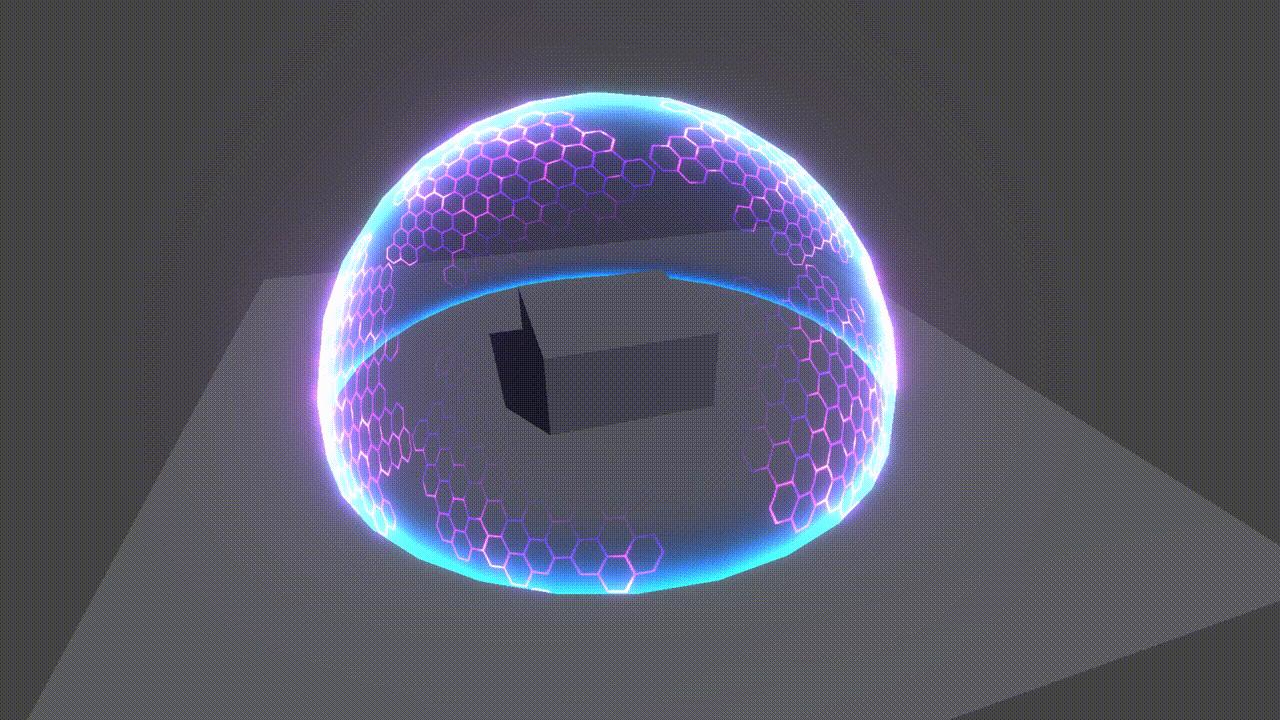 溶解接下来制作启动能量盾的溶解效果,用像素点的y坐标控制溶解,再叠加噪声做不规则轮廓 //Properties_Noise ("Noise", 2D) = "white" {} _DissolveThreshold ("DissolveThreshold", Float) = 1 _DissolveWidth ("DissolveWidth", Float) = 0.1 [HDR] _DissolveColor ("DissolveColor", Color) = (1, 1, 1, 1) sampler2D _Noise; float4 _Noise_ST; float _DissolveThreshold; float _DissolveWidth; float4 _DissolveColor; //frag if(i.localPos.y > _DissolveThreshold) { discard; } else if(i.localPos.y > _DissolveThreshold - _DissolveWidth) { float t = (i.localPos.y - _DissolveThreshold + _DissolveWidth) / _DissolveWidth; float noise = tex2D(_Noise, i.uv * _Noise_ST.xy + _Noise_ST.zw * _Time.y); noise = lerp(1, noise * (1 - t), pow(t, 0.5)); if(noise > 0.5) { finalColor = _DissolveColor; }else { discard; } }  https://www.zhihu.com/video/1626236203392466944 颜色交互接下来制作最复杂的交互功能,思路是用脚本把交互点,交互半径,交互颜色传入材质球,然后在shader中,计算像素点和交互点的距离,如果在交互半径内则显示交互颜色。 听起来很简单,就是一句话的事,实现起来......  新建一个Shield.cs脚本,把传递交互信息的API封装好 public class Shield : MonoBehaviour {private class InteractionData { public Color color; public Vector3 interactionStartPos; public float timer; } public List<Material> materials; private List<InteractionData> interactionDatas = new List<InteractionData>(); private void Update() { //...... for (int i = 0; i < materials.Count; i++) { materials[i].SetInt("_InteractionNumber", interactionDatas.Count); if (interactionDatas.Count > 0) { materials[i].SetVectorArray("_InteractionStartPosArray", interactionStartPosArray); materials[i].SetFloatArray("_InteractionInnerRadiusArray", interactionInnerRadiusArray); materials[i].SetFloatArray("_InteractionOuterRadiusArray", interactionOuterRadiusArray); materials[i].SetFloatArray("_InteractionAlphaArray", interactionAlphaArray); materials[i].SetColorArray("_InteractionColorArray", interactionColorArray); materials[i].SetFloatArray("_DistortAlphaArray", distortAlphaArray); } } } public void AddInteractionData(Vector3 pos, Color color) { if (interactionDatas.Count >= 100) { return; } InteractionData interactionData = new InteractionData(); interactionData.color = color; interactionData.interactionStartPos = pos; interactionDatas.Add(interactionData); } } 新建一个ShootManager.cs脚本,在点击鼠标时,做射线检测,如果碰撞到能量盾,则调用交互接口 public class ShootManager : MonoBehaviour {[ColorUsage(true, true)] public Color interactionColor; private void Update() { if (Input.GetMouseButtonDown(0)) { RaycastHit hitInfo; bool hited = Physics.Raycast(Camera.main.ScreenPointToRay(Input.mousePosition), out hitInfo, Mathf.Infinity); if (hited) { Shield.instance.AddInteractionData(hitInfo.point, interactionColor); } } } } 然后在Shader里计算 //Propertiesint _InteractionNumber; float3 _InteractionStartPosArray[100]; float _InteractionInnerRadiusArray[100]; float _InteractionOuterRadiusArray[100]; float _InteractionAlphaArray[100]; float4 _InteractionColorArray[100]; float _DistortAlphaArray[100]; float GetInteractionIntensity(v2f i, float3 startPos, float innerRadius, float outerRadius) { float dist = distance(i.worldPos, startPos); if(dist > outerRadius || dist < innerRadius) { return 0; } else { float intensity = (dist - innerRadius) / (outerRadius - innerRadius); return intensity; } } //frag float interactionIntensity = 0; float4 interactionColor = 0; for(int iii = 0; iii < _InteractionNumber; iii++) { float tempInteractionIntensity = GetInteractionIntensity(i, _InteractionStartPosArray[iii], _InteractionInnerRadiusArray[iii], _InteractionOuterRadiusArray[iii]) * _InteractionAlphaArray[iii]; interactionIntensity += tempInteractionIntensity; interactionColor += _InteractionColorArray[iii] * tempInteractionIntensity; } interactionIntensity = saturate(interactionIntensity); finalColor += interactionColor; finalColor.a = saturate(finalColor.a);  https://www.zhihu.com/video/1626237758866972672 在交互区域,对纹理做提亮和扭曲 //Properties_DistortNormal ("DistortNormal", 2D) = "bump" {} _DistortIntensity ("DistortIntensity", Float) = 1 sampler2D _DistortNormal; float4 _DistortNormal_ST; float _DistortIntensity; float GetDistortIntensity(v2f i, float3 startPos, float innerRadius, float outerRadius) { float dist = distance(i.worldPos, startPos); if(dist > outerRadius) { return 0; } else { float intensity = dist / outerRadius; return intensity; } } //frag float3 distortNormal = UnpackNormal(tex2D(_DistortNormal, i.uv * _DistortNormal_ST.xy + _DistortNormal_ST.zw * _Time.y)); distortNormal *= _DistortIntensity * distortIntensity; float distortIntensity = 0; for(int iii = 0; iii < _InteractionNumber; iii++) { //...... distortIntensity += GetDistortIntensity(i, _InteractionStartPosArray[iii], _InteractionInnerRadiusArray[iii], _InteractionOuterRadiusArray[iii]) * _DistortAlphaArray[iii]; distortIntensity = saturate(distortIntensity); } float patternIntensity = texCUBE(_PatternTex, normal + distortNormal).a * isFrontFace; patternIntensity *= pow(ndv + interactionIntensity, _PatternPower);  https://www.zhihu.com/video/1626213140663791616 扭曲交互交互功能还差最后一步  接下来做交互区域的屏幕扭曲效果,原理是用一张法线贴图修改屏幕UV,然后采样_CameraOpaqueTexture, 新建Shield_Distort.shader,把能量盾Shader里的代码复制过来,添加 sampler2D _CameraOpaqueTexture;float4 _CameraOpaqueTexture_TexelSize; 修改片元着色器 float4 frag (v2f i) : SV_Target{ float4 finalColor = 0; float distortIntensity = 0; for(int iii = 0; iii < _InteractionNumber; iii++) { distortIntensity += GetDistortIntensity(i, _InteractionStartPosArray[iii], _InteractionInnerRadiusArray[iii], _InteractionOuterRadiusArray[iii]) * _DistortAlphaArray[iii]; distortIntensity = saturate(distortIntensity); } float3 distortNormal = UnpackNormal(tex2D(_DistortNormal, i.uv * _DistortNormal_ST.xy + _DistortNormal_ST.zw * _Time.y)); distortNormal *= _DistortIntensity * distortIntensity; i.screenPos.xyz /= i.screenPos.w; float2 screenUV = i.screenPos.xy; screenUV = (screenUV + 1) / 2; finalColor = tex2D(_CameraOpaqueTexture, screenUV + distortNormal.xy * _CameraOpaqueTexture_TexelSize.xy); return finalColor; } 把能量盾复制一份,换上新材质   https://www.zhihu.com/video/1626217980341170177 至此,我们的能量盾就完成了!  源文件下载Github https://github.com/MagicStones23/Unity-Shader-Tutorial-Interactable-Energy-Shield 百度网盘 https://pan.baidu.com/s/1pyjMz4aokWlqRluV86Wq1w?pwd=1111 提取码:1111 备注:工程中部分素材取自互联网,请勿在商业中使用 B站主页 |
相关文章
单一产品如何推广(找准这五点,让你花小钱办大事)
随着生活水平的提高,消费群体的要求也在不断提高,传统的单一,的销售渠道,单一的销售人员已经不能满足客户需求。随着互联网经济的发展,很多企业也开始涉足网络营销方式进行产品推广,但往往不知道如何做才是最有效的。其实在网络营销的过程中最重要的就是产品定位,对于单一产品推广来说,定位和推广至关重要...
淘特商品品质抽检规则大全(淘宝抽检针对哪些方面呢)
商品描述,是指商家在店铺页面、商品详情页面、推广页面、客服聊天工具等任何向消费者展示的场景中,以文字、图片、音频、视频等形式,对所销售商品本身(基本属性、规格、数量、保质期、瑕疵等)、品牌、外包装、发货情况、交易附带物等信息所做的明示或暗示的描述。...

做展示型网站都需要哪些基本栏目。
一般企业都会知道,网站里上传什么,客户就看到什么。怎么去突出自己,让客户关注自己,那么就要在这些栏目里上传相应的内容。那么做网站都需要哪些基本栏目呢? 一、企业简介 基本上每个网站里,都会有个位置专门用来展示企业简介,为的是让客户了解他们。然而这个栏目不仅仅只有简介,还可以有企业文化、资质荣誉、...

现在是企业做品牌的大好机会(小企业如何做大做强)
我是千帆江海阔,点点上面的头像,欢迎关注我哦!定期更新!了解企业干货! 现在是做好品牌最好的时间,现在互联网爆炸信息传播,让企业能够更好触到达客户,从而有了品牌的机会! 我们做品牌不用害怕大品牌打压。今天我们可以看到很多大品牌很僵化、很中心化,他们不创新,他们不开拓,所以给了我们创新品牌很多的机...

金融行业投放趣头条广告指南!!
趣头条广告通过数据能力多维度触达目标消费群体,进行已转化人群20倍到50倍之间的拓展投放,对金融立方人群进行5个以上维度的多维定向投放;同时建议广告主尝试行为兴趣定向,捕获潜客第一手需求,或结合金融关键词进行投放。 一、解决曝光低 趣头条针对金融广告在窄定向时面临广告刷量过滤的问题,提...

化工行业全网营销型网站建设哪家好。
导读:化工企业是典型的传统企业,线下竞争日益激烈,已经有许多化工企业都把营销搬到互联网上,但许多的化工企业网络营销都走的很失败,为什么会出现这种问题呢,许多化工企业不清楚自己的盈利模式,在全网营销型网站建设上也不够重视,随便找家便宜的建站公司做了一个模板网站,这种网站,完全没有考虑营销性,没有考虑优...